I. What Is a Cart Drawer?
A Cart Drawer is a cart type provided by Shopify that opens as a slide‑out panel on the same page when customers add products to their cart.
Instead of redirecting shoppers to a separate cart page with a different URL, the cart drawer allows customers to:
Stay on the product or collection page
Quickly review items added to the cart, update quantities or remove them
Proceed to checkout directly from the cart
This creates a smoother shopping flow and reduces interruptions during the buying journey.
II. Theme Cart vs. Amote Cart Drawer
1. Customization & Branding
Theme Cart offers only basic design flexibility. Its colors, layout, and overall appearance are mostly determined by the theme itself, which limits how much you can customize the cart to match your brand. While functional, the theme cart often feels disconnected from the rest of the storefront design.
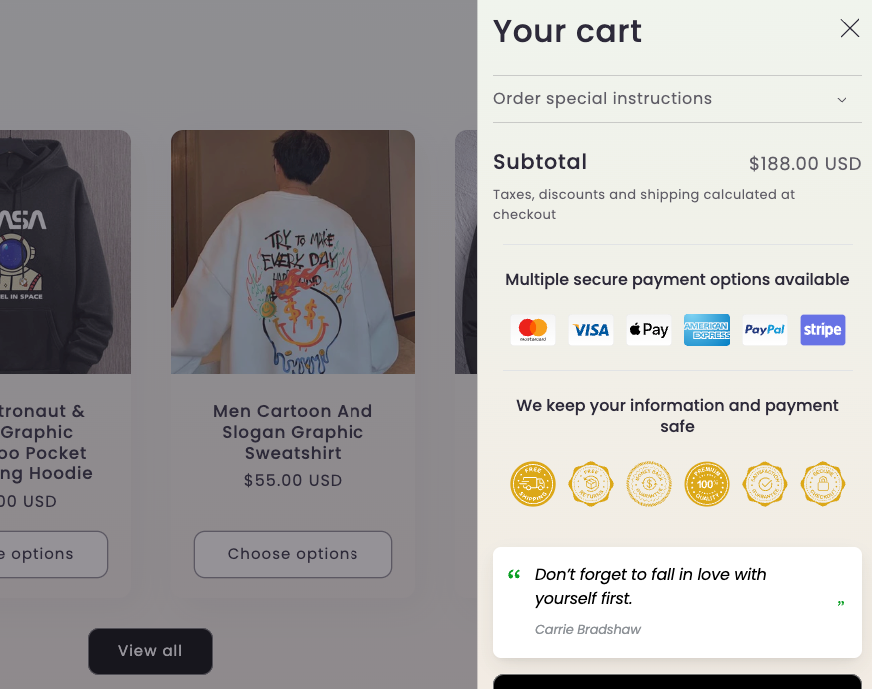
Theme default cart
Amote Cart Drawer provides full customization to align with your brand identity. You can control background colors, text styles, button designs, and layout elements to ensure the cart blends seamlessly with your storefront. This creates a more seamless and consistent brand experience across your store.
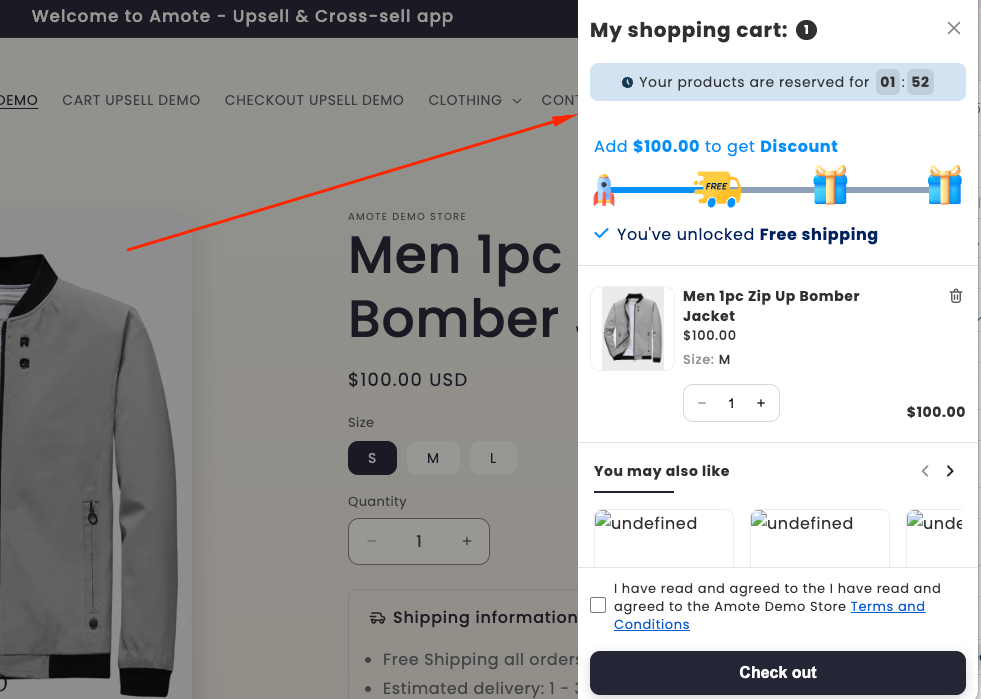
Amote cart drawer
2. From a Simple Cart to a Conversion Tool
The default Shopify theme cart focuses on basic cart information, such as the products added, their quantities, and the total price. While it serves its core purpose, it offers limited opportunities to engage customers or encourage them to add more items before checkout.
Amote Cart Drawer transforms the cart into a high-impact conversion space by introducing engagement and incentive features directly inside the cart. These features are designed to keep customers engaged, build trust, and motivate them to complete their purchase with higher order value.
Key Features in Amote Cart Drawer:
Rewards Progress Bar
Encourage customers to add more items by showing how close they are to rewards such as free shipping or discounts.In-Cart Upsell & Cross-Sell
Recommend relevant or frequently paired products directly inside the cart to increase Average Order Value (AOV).Countdown Timer
Create urgency with time-limited offers that encourage customers to complete checkout faster.Trust Badges
Build confidence by displaying trust signals such as secure checkout or satisfaction guarantees.Frequently Bought Together
Highlight complementary products that are commonly purchased together to simplify buying decisions.Quotes & Additional Notes
Display short messages, reminders, or custom notes to guide customers and enhance the checkout experience.
If you need further guidance or have any questions, don't hesitate to reach out to our support team via email at support@amote.app or submit a ticket here. We'd be happy to help.
Was this article helpful?
That’s Great!
Thank you for your feedback
Sorry! We couldn't be helpful
Thank you for your feedback
Feedback sent
We appreciate your effort and will try to fix the article